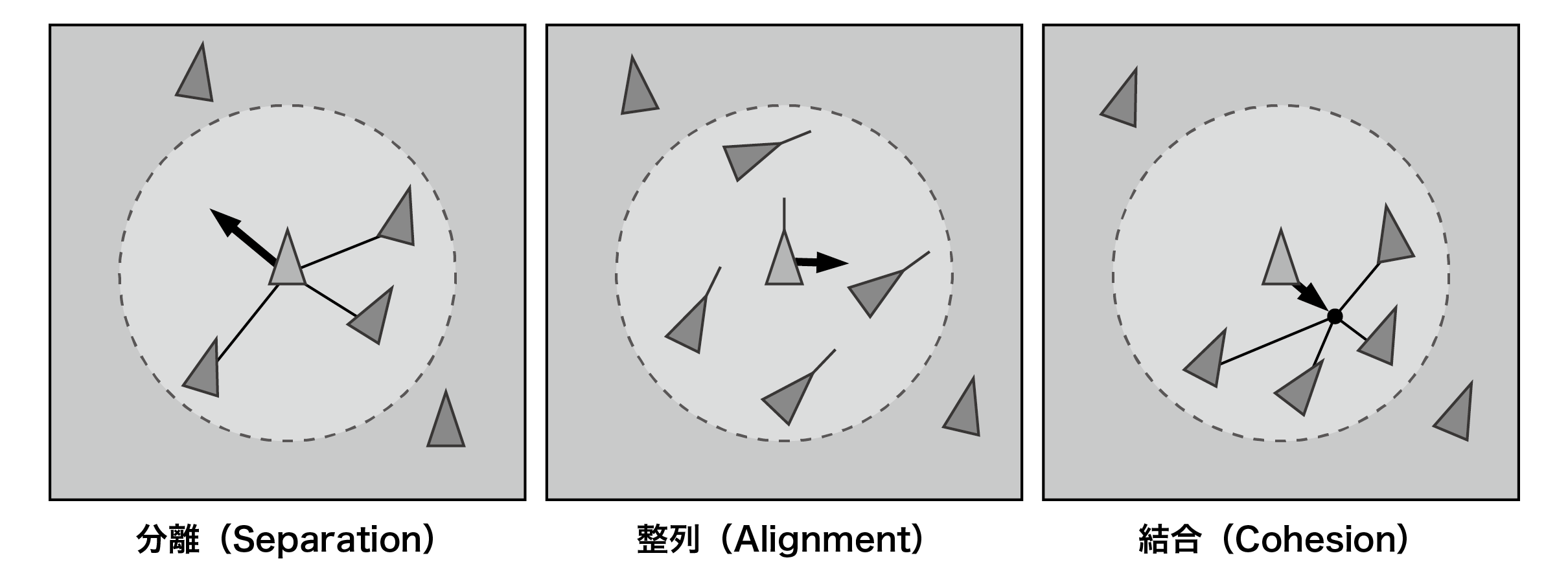
Figure 3.1: Basic rules for Boids
In this chapter, we will explain the implementation of group simulation using the Boids algorithm using Compute Shader. Birds, fish and other terrestrial animals sometimes flock. The movements of this group show regularity and complexity, and have a certain beauty and have attracted people. In computer graphics, it is not realistic to control the behavior of each individual by hand, and an algorithm for forming a group called Boids was devised. This simulation algorithm consists of some simple rules and is easy to implement, but in a simple implementation it is necessary to check the positional relationship with all individuals, and as the number of individuals increases, it becomes squared. The amount of calculation will increase proportionally. If you want to control many individuals, it is very difficult to implement with CPU. Therefore, we will take advantage of the powerful parallel computing power of the GPU. Unity provides a shader program called Compute Shader to perform such general purpose computing (GPGPU) by GPU. The GPU has a special storage area called shared memory, which can be used effectively by using Compute Shader. In addition, Unity has an advanced rendering function called GPU instancing, which allows you to draw a large number of arbitrary meshes. We will introduce a program that controls and draws a large number of Boid objects using the functions that make use of the computing power of these Unity GPUs.
A group of simulation algorithms called Boids was developed by Craig Reynolds in 1986 and published the following year in 1987 at ACM SIGGRAPH as a paper entitled "Flocks, Herds, and Schools: A Distributed Behavioral Model".
In Reynolds, a herd produces complex behavior as a result of each individual modifying its own behavior based on the position and direction of movement of other individuals around it, through perceptions such as sight and hearing. Pay attention to the fact that there is.
Each individual follows three simple rules of conduct:
Move to avoid crowding with individuals within a certain distance
Individuals within a certain distance move toward the average in the direction they are facing
Move to the average position of an individual within a certain distance
Figure 3.1: Basic rules for Boids
You can program the movement of the herd by controlling the individual movements according to these rules.
https://github.com/IndieVisualLab/UnityGraphicsProgramming
Open the BoidsSimulationOnGPU.unity scene data in the Assets / BoidsSimulationOnGPU folder in the sample Unity project in this document .
The programs introduced in this chapter use Compute Shader and GPU instancing.
ComputeShader runs on the following platforms or APIs:
GPU instancing is available on the following platforms or APIs:
In this sample program, Graphics.DrawMeshInstacedIndirect method is used. Therefore, the Unity version must be 5.6 or later.
This sample program consists of the following code.
Scripts, material resources, etc. are set like this
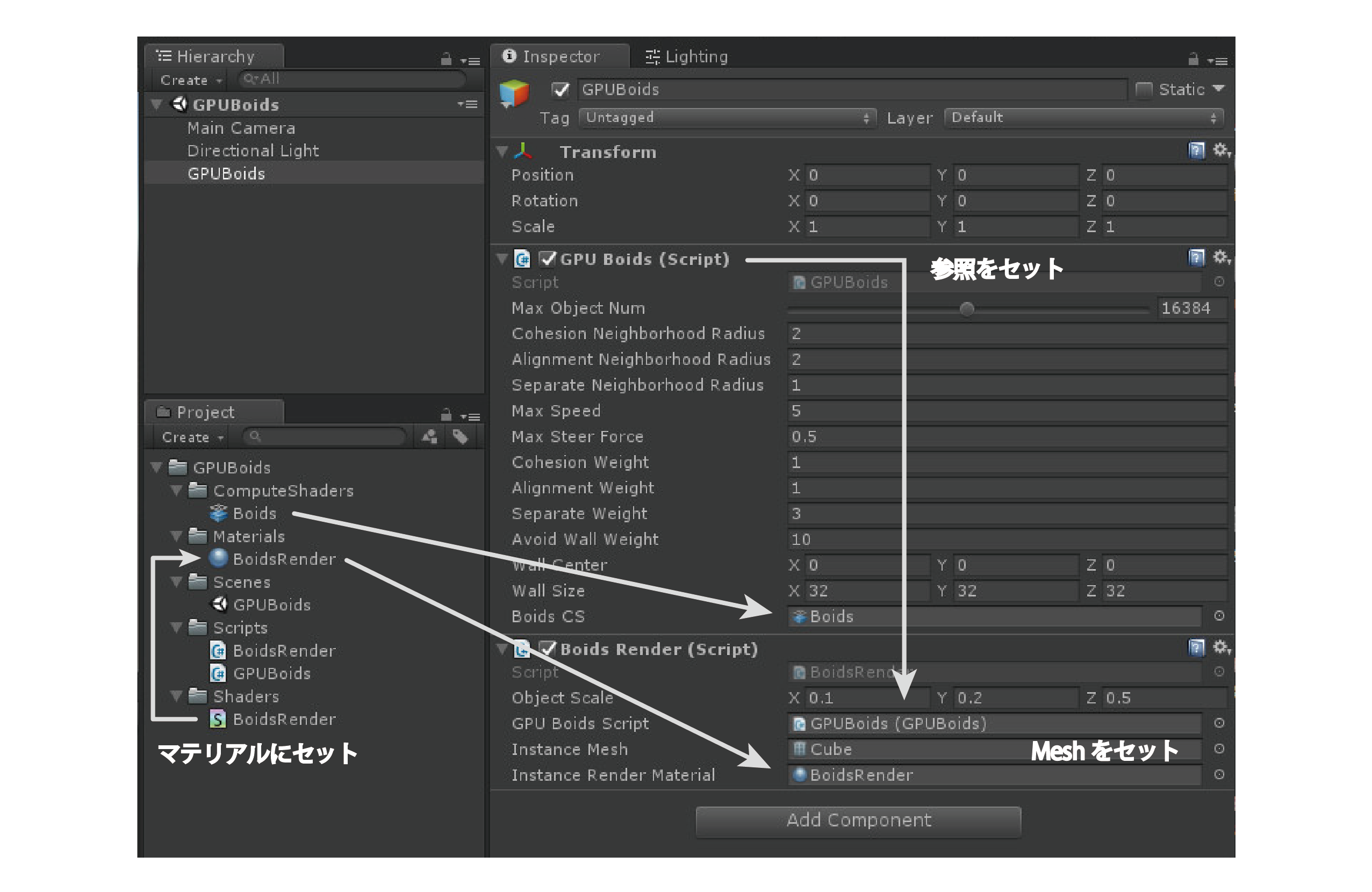
Figure 3.2: Settings on Unity Editor
This code manages Boids simulation parameters, Compute Shader that describes buffers and calculation instructions required for calculations on the GPU, and so on.
GPUBoids.cs
using UnityEngine;
using System.Collections;
using System.Collections.Generic;
using System.Runtime.InteropServices;

public class GPUBoids : MonoBehaviour
{
    // Boid data structure
    [System.Serializable]
    struct BoidData
    {
        public Vector3 Velocity; // Velocity
        public Vector3 Position; // position
    }
    // Thread size of thread group
    const int SIMULATION_BLOCK_SIZE = 256;

    #region Boids Parameters
    // Maximum number of objects
    [Range(256, 32768)]
    public int MaxObjectNum = 16384;

    // Radius with other individuals to which the bond applies
    public float CohesionNeighborhoodRadius  = 2.0f;
    // Radius with other individuals to which alignment is applied
    public float AlignmentNeighborhoodRadius = 2.0f;
    // Radius with other individuals to which separation is applied
    public float SeparateNeighborhoodRadius  = 1.0f;

    // Maximum speed
    public float MaxSpeed        = 5.0f;
    // Maximum steering force
    public float MaxSteerForce   = 0.5f;

    // Weight of binding force
    public float CohesionWeight  = 1.0f;
    // Weight of aligning force
    public float AlignmentWeight = 1.0f;
    // Weight of separating force
    public float SeparateWeight  = 3.0f;

    // Weight of force to avoid walls
    public float AvoidWallWeight = 10.0f;

    // Center coordinates of the wall
    public Vector3 WallCenter = Vector3.zero;
    // wall size
    public Vector3 WallSize = new Vector3(32.0f, 32.0f, 32.0f);
    #endregion

    #region Built-in Resources
    // Reference to Compute Shader for Boids simulation
    public ComputeShader BoidsCS;
    #endregion

    #region Private Resources
    // Buffer that stores the steering force (Force) of the Boid
    ComputeBuffer _boidForceBuffer;
    // Buffer containing basic Boid data (speed, position)
    ComputeBuffer _boidDataBuffer;
    #endregion

    #region Accessors
    // Get the buffer that stores the basic data of Boid
    public ComputeBuffer GetBoidDataBuffer()
    {
        return this._boidDataBuffer != null ? this._boidDataBuffer : null;
    }

    // Get the number of objects
    public int GetMaxObjectNum()
    {
        return this.MaxObjectNum;
    }

    // Returns the center coordinates of the simulation area
    public Vector3 GetSimulationAreaCenter()
    {
        return this.WallCenter;
    }

    // Returns the size of the box in the simulation area
    public Vector3 GetSimulationAreaSize()
    {
        return this.WallSize;
    }
    #endregion

    #region MonoBehaviour Functions
    void Start()
    {
        // Initialize the buffer
        InitBuffer();
    }

    void Update()
    {
        // simulation
        Simulation();
    }

    void OnDestroy()
    {
        // Discard the buffer
        ReleaseBuffer();
    }

    void OnDrawGizmos()
    {
        // Draw the simulation area in wireframe as a debug
        Gizmos.color = Color.cyan;
        Gizmos.DrawWireCube (WallCenter, WallSize);
    }
    #endregion

    #region Private Functions
    // Initialize the buffer
    void InitBuffer()
    {
        // Initialize the buffer
        _boidDataBuffer  = new ComputeBuffer(MaxObjectNum,
            Marshal.SizeOf(typeof(BoidData)));
        _boidForceBuffer = new ComputeBuffer(MaxObjectNum,
            Marshal.SizeOf(typeof(Vector3)));

        // Initialize Boid data, Force buffer
        var forceArr = new Vector3[MaxObjectNum];
        var boidDataArr = new BoidData [MaxObjectNum];
        for (var i = 0; i < MaxObjectNum; i++)
        {
            forceArr[i] = Vector3.zero;
            boidDataArr[i].Position = Random.insideUnitSphere * 1.0f;
            boidDataArr[i].Velocity = Random.insideUnitSphere * 0.1f;
        }
        _boidForceBuffer.SetData(forceArr);
        _boidDataBuffer.SetData(boidDataArr);
        forceArr    = null;
        boidDataArr = null;
    }

    // simulation
    void Simulation()
    {
        ComputeShader cs = BoidsCS;
        int id = -1;

        // Find the number of thread groups
        int threadGroupSize = Mathf.CeilToInt(MaxObjectNum
            / SIMULATION_BLOCK_SIZE);

        // Calculate steering force
        id = cs.FindKernel ("ForceCS"); // Get the kernel ID
        cs.SetInt("_MaxBoidObjectNum", MaxObjectNum);
        cs.SetFloat("_CohesionNeighborhoodRadius",
            CohesionNeighborhoodRadius);
        cs.SetFloat("_AlignmentNeighborhoodRadius",
            AlignmentNeighborhoodRadius);
        cs.SetFloat("_SeparateNeighborhoodRadius",
            SeparateNeighborhoodRadius);
        cs.SetFloat ("_ MaxSpeed", MaxSpeed);
        cs.SetFloat("_MaxSteerForce", MaxSteerForce);
        cs.SetFloat("_SeparateWeight", SeparateWeight);
        cs.SetFloat("_CohesionWeight", CohesionWeight);
        cs.SetFloat("_AlignmentWeight", AlignmentWeight);
        cs.SetVector("_WallCenter", WallCenter);
        cs.SetVector("_WallSize", WallSize);
        cs.SetFloat("_AvoidWallWeight", AvoidWallWeight);
        cs.SetBuffer(id, "_BoidDataBufferRead", _boidDataBuffer);
        cs.SetBuffer(id, "_BoidForceBufferWrite", _boidForceBuffer);
        cs.Dispatch (id, threadGroupSize, 1, 1); // Run Compute Shader

        // Calculate speed and position from steering force
        id = cs.FindKernel ("IntegrateCS"); // Get the kernel ID
        cs.SetFloat("_DeltaTime", Time.deltaTime);
        cs.SetBuffer(id, "_BoidForceBufferRead", _boidForceBuffer);
        cs.SetBuffer(id, "_BoidDataBufferWrite", _boidDataBuffer);
        cs.Dispatch (id, threadGroupSize, 1, 1); // Run Compute Shader
    }

    // Free the buffer
    void ReleaseBuffer()
    {
        if (_boidDataBuffer != null)
        {
            _boidDataBuffer.Release();
            _boidDataBuffer = null;
        }

        if (_boidForceBuffer != null)
        {
            _boidForceBuffer.Release();
            _boidForceBuffer = null;
        }
    }
    #endregion
}
The InitBuffer function declares the buffer to use when performing calculations on the GPU. We use a class called ComputeBuffer as a buffer to store the data to be calculated on the GPU. Compute Buffer is a data buffer that stores data for the Compute Shader. You will be able to read and write to the memory buffer on the GPU from a C # script. Pass the number of elements in the buffer and the size (number of bytes) of one element as arguments at initialization. You can get the size (in bytes) of the type by using the Marshal.SizeOf () method. In ComputeBuffer, you can use SetData () to set the value of an array of any structure.
The Simulation function passes the required parameters to ComputeShader and issues a calculation instruction.
The function written in ComputeShader that actually causes the GPU to perform calculations is called the kernel. The execution unit of this kernel is called a thread, and in order to perform parallel computing processing according to the GPU architecture, any number is treated as a group, and they are called a thread group. Set the product of the number of threads and the number of thread groups to be equal to or greater than the number of Boid objects.
The kernel is specified in the ComputeShader script using the #pragma kernel directive. An ID is assigned to each of them, and you can get this ID from the C # script by using the FindKernel method.
Use the SetFloat method, SetVector method, SetBuffer method, etc. to pass the parameters and buffers required for simulation to the Compute Shader. You will need the kernel ID when setting buffers and textures.
By executing the Dispatch method, an instruction is issued to calculate the kernel defined in Compute Shader on the GPU. In the arguments, specify the kernel ID and the number of thread groups.
Describe the calculation instruction to GPU. There are two kernels, one that calculates the steering force and the other that applies that force to update speed and position.
Boids.compute
// Specify kernel function
#pragma kernel ForceCS // Calculate steering force
#pragma kernel IntegrateCS // Calculate speed and position
// Boid data structure
struct BoidData
{
float3 velocity; // velocity
float3 position; // position
};
// Thread size of thread group
#define SIMULATION_BLOCK_SIZE 256
// Boid data buffer (for reading)
StructuredBuffer<BoidData> _BoidDataBufferRead;
// Boid data buffer (for reading and writing)
RWStructuredBuffer<BoidData> _BoidDataBufferWrite;
// Boid steering force buffer (for reading)
StructuredBuffer<float3> _BoidForceBufferRead;
// Boid steering force buffer (for reading and writing)
RWStructuredBuffer<float3> _BoidForceBufferWrite;
int _MaxBoidObjectNum; // Number of Boid objects
float _DeltaTime; // Time elapsed from the previous frame
float _SeparateNeighborhoodRadius; // Distance to other individuals to which separation is applied
float _AlignmentNeighborhoodRadius; // Distance to other individuals to which alignment is applied
float _CohesionNeighborhoodRadius; // Distance to other individuals to which the bond applies
float _MaxSpeed; // Maximum speed
float _MaxSteerForce; // Maximum steering force
float _SeparateWeight; // Weight when applying separation
float _AlignmentWeight; // Weight when applying alignment
float _CohesionWeight; // Weight when applying join
float4 _WallCenter; // Wall center coordinates
float4 _WallSize; // Wall size
float _AvoidWallWeight; // Weight of strength to avoid walls
// Limit the magnitude of the vector
float3 limit(float3 vec, float max)
{
float length = sqrt (dot (vec, vec)); // size
return (length > max && length > 0) ? vec.xyz * (max / length) : vec.xyz;
}
// Return the opposite force when hitting the wall
float3 avoidWall(float3 position)
{
float3 wc = _WallCenter.xyz;
float3 ws = _WallSize.xyz;
float3 acc = float3(0, 0, 0);
// x
acc.x = (position.x < wc.x - ws.x * 0.5) ? acc.x + 1.0 : acc.x;
acc.x = (position.x > wc.x + ws.x * 0.5) ? acc.x - 1.0 : acc.x;
// Y
acc.y = (position.y < wc.y - ws.y * 0.5) ? acc.y + 1.0 : acc.y;
acc.y = (position.y > wc.y + ws.y * 0.5) ? acc.y - 1.0 : acc.y;
// with
acc.z = (position.z <wc.z - ws.z * 0.5)? acc.z + 1.0: acc.z;
acc.z = (position.z > wc.z + ws.z * 0.5) ? acc.z - 1.0 : acc.z;
return acc;
}
// Shared memory for Boid data storage
groupshared BoidData boid_data[SIMULATION_BLOCK_SIZE];
// Kernel function for calculating steering force
[numthreads(SIMULATION_BLOCK_SIZE, 1, 1)]
void ForceCS
(
uint3 DTid: SV_DispatchThreadID, // ID unique to the entire thread
uint3 Gid: SV_GroupID, // Group ID
uint3 GTid: SV_GroupThreadID, // Thread ID in the group
uint GI: SV_GroupIndex // SV_GroupThreadID in one dimension 0-255
)
{
const unsigned int P_ID = DTid.x; // own ID
float3 P_position = _BoidDataBufferRead [P_ID] .position; // own position
float3 P_velocity = _BoidDataBufferRead [P_ID] .velocity; // own speed
float3 force = float3 (0, 0, 0); // Initialize steering force
float3 sepPosSum = float3 (0, 0, 0); // Position addition variable for separation calculation
int sepCount = 0; // Variable for counting the number of other individuals calculated for separation
float3 aliVelSum = float3 (0, 0, 0); // Velocity addition variable for alignment calculation
int aliCount = 0; // Variable for counting the number of other individuals calculated for alignment
float3 cohPosSum = float3 (0, 0, 0); // Position addition variable for join calculation
int cohCount = 0; // Variable for counting the number of other individuals calculated for binding
// Execution for each SIMULATION_BLOCK_SIZE (number of group threads) (execution for the number of groups)
[loop]
for (uint N_block_ID = 0; N_block_ID < (uint)_MaxBoidObjectNum;
N_block_ID += SIMULATION_BLOCK_SIZE)
{
// Store Boid data for SIMULATION_BLOCK_SIZE in shared memory
boid_data[GI] = _BoidDataBufferRead[N_block_ID + GI];
// All group sharing access is complete
// Until all threads in the group reach this call
// Block the execution of all threads in the group
GroupMemoryBarrierWithGroupSync();
// Calculation with other individuals
for (int N_tile_ID = 0; N_tile_ID < SIMULATION_BLOCK_SIZE;
N_tile_ID++)
{
// Position of other individuals
float3 N_position = boid_data[N_tile_ID].position;
// Speed of other individuals
float3 N_velocity = boid_data[N_tile_ID].velocity;
// Difference in position between yourself and other individuals
float3 diff = P_position - N_position;
// Distance between yourself and the position of other individuals
float dist = sqrt(dot(diff, diff));
// --- Separation ---
if (dist > 0.0 && dist <= _SeparateNeighborhoodRadius)
{
// Vector from the position of another individual to itself
float3 repulse = normalize(P_position - N_position);
// Divide by the distance between yourself and the position of another individual (the longer the distance, the smaller the effect)
repulse /= dist;
sepPosSum + = repulse; // Add
sepCount ++; // Population count
}
// --- Alignment ---
if (dist > 0.0 && dist <= _AlignmentNeighborhoodRadius)
{
aliVelSum + = N_velocity; // Add
aliCount ++; // Population count
}
// --- Cohesion ---
if (dist > 0.0 && dist <= _CohesionNeighborhoodRadius)
{
cohPosSum + = N_position; // Add
cohCount ++; // Population count
}
}
GroupMemoryBarrierWithGroupSync();
}
// steering force (separated)
float3 sepSteer = (float3)0.0;
if (sepCount > 0)
{
sepSteer = sepPosSum / (float) sepCount; // Calculate the average
sepSteer = normalize (sepSteer) * _MaxSpeed; // Adjust to maximum speed
sepSteer = sepSteer --P_velocity; // Calculate steering force
sepSteer = limit (sepSteer, _MaxSteerForce); // Limit steering force
}
// Steering force (alignment)
float3 aliSteer = (float3)0.0;
if (aliCount > 0)
{
aliSteer = aliVelSum / (float) aliCount; // Calculate the average velocity of close individuals
aliSteer = normalize (aliSteer) * _MaxSpeed; // Adjust to maximum speed
aliSteer = aliSteer --P_velocity; // Calculate steering force
aliSteer = limit (aliSteer, _MaxSteerForce); // Limit steering force
}
// steering force (combined)
float3 cohSteer = (float3)0.0;
if (cohCount > 0)
{
// / Calculate the average of the positions of close individuals
cohPosSum = cohPosSum / (float)cohCount;
cohSteer = cohPosSum --P_position; // Find the vector in the average position direction
cohSteer = normalize (cohSteer) * _MaxSpeed; // Adjust to maximum speed
cohSteer = cohSteer --P_velocity; // Calculate steering force
cohSteer = limit (cohSteer, _MaxSteerForce); // Limit steering force
}
force + = aliSteer * _AlignmentWeight; // Add a force to align with the steering force
force + = cohSteer * _CohesionWeight; // Add force to combine with steering force
force + = sepSteer * _SeparateWeight; // Add a separating force to the steering force
_BoidForceBufferWrite [P_ID] = force; // Write
}
// Kernel function for speed and position calculation
[numthreads(SIMULATION_BLOCK_SIZE, 1, 1)]
void IntegrateCS
(
uint3 DTid: SV_DispatchThreadID // Unique ID for the entire thread
)
{
const unsigned int P_ID = DTid.x; // Get index
BoidData b = _BoidDataBufferWrite [P_ID]; // Read the current Boid data
float3 force = _BoidForceBufferRead [P_ID]; // Read the steering force
// Give repulsive force when approaching the wall
force += avoidWall(b.position) * _AvoidWallWeight;
b.velocity + = force * _DeltaTime; // Apply steering force to speed
b.velocity = limit (b.velocity, _MaxSpeed); // Limit speed
b.position + = b.velocity * _DeltaTime; // Update position
_BoidDataBufferWrite [P_ID] = b; // Write the calculation result
}
The ForceCS kernel calculates the steering force.
Variables with the storage qualifier groupshared will now be written to shared memory. Shared memory cannot write large amounts of data, but it is located close to registers and can be accessed very quickly. This shared memory can be shared within the thread group. By writing the information of other individuals for SIMULATION_BLOCK_SIZE together in the shared memory so that it can be read at high speed within the same thread group, the calculation considering the positional relationship with other individuals is efficient. I will go to the target.
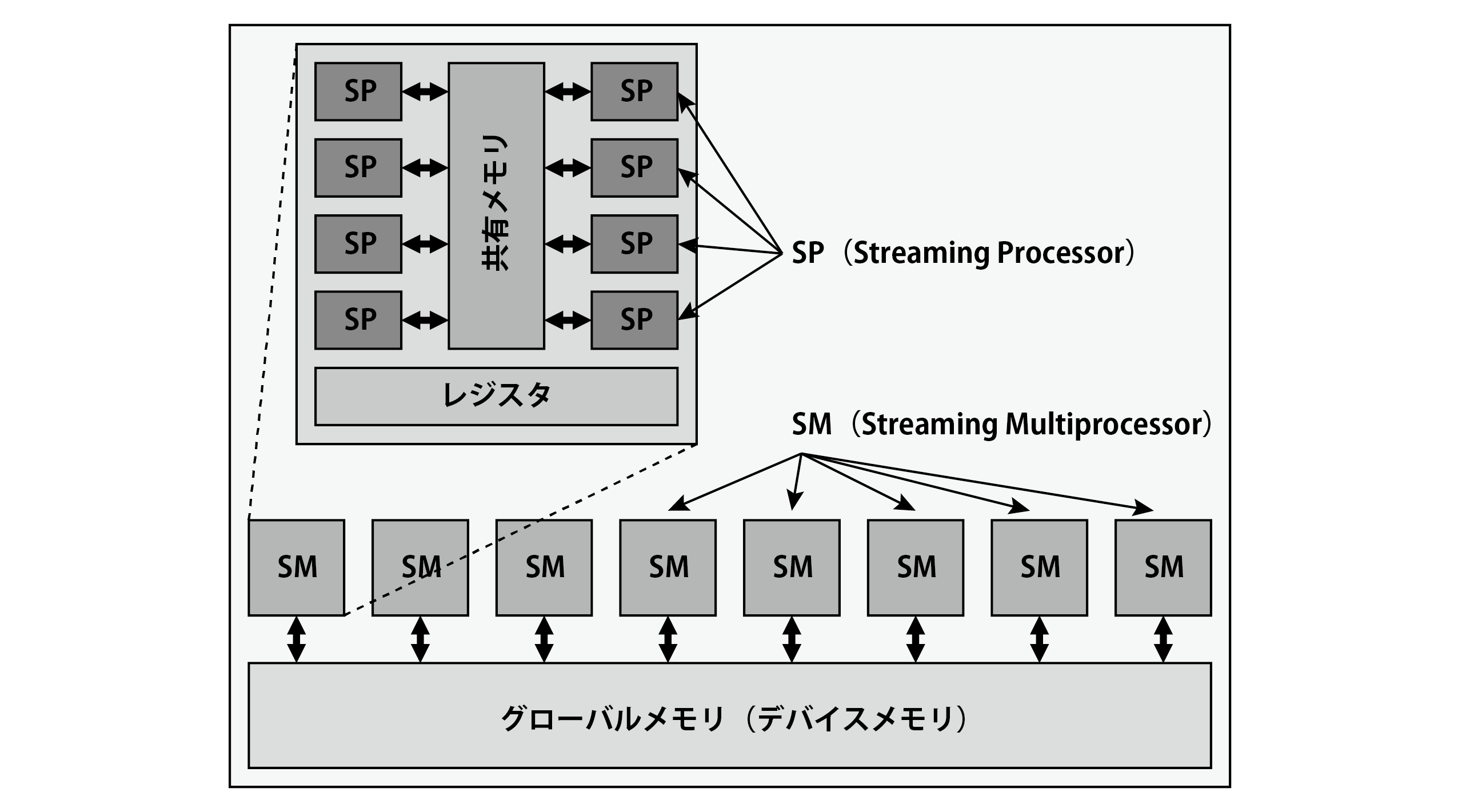
Figure 3.3: Basic GPU architecture
When accessing the data written to the shared memory, it is necessary to describe the GroupMemoryBarrierWithGroupSync () method to synchronize the processing of all threads in the thread group. GroupMemoryBarrierWithGroupSync () blocks the execution of all threads in the group until all threads in the thread group reach this call. This ensures that all threads in the thread group have properly initialized the boid_data array.
If there is an individual closer than the specified distance, the vector from the position of the individual to its own position is calculated and normalized. By dividing the vector by the value of the distance, it is weighted so that it avoids more when it is closer and avoids it smaller when it is far, and it is added as a force to prevent collision with other individuals. After the calculation with all the individuals is completed, the steering force is calculated from the relationship with the current speed using the value.
If there is an individual closer than the specified distance, the velocity (Velocity) of that individual is added up, the number of the individual is counted at the same time, and the velocity of the close individual (that is, the direction in which it is facing) is calculated by those values. Calculate the average of. After the calculation with all the individuals is completed, the steering force is calculated from the relationship with the current speed using the value.
If there is an individual closer than the specified distance, the position of that individual is added, the number of the individual is counted at the same time, and the average (center of gravity) of the position of the close individual is calculated from those values. Furthermore, the vector toward that point is found, and the steering force is found in relation to the current speed.
The IntegrateCS kernel updates the speed and position of the Boid based on the steering force obtained by ForceCS (). In AvoidWall, when you try to go out of the specified area, it applies a reverse force to stay inside the area.
This script draws the results obtained from the Boids simulation on the specified mesh.
BoidsRender.cs
using System.Collections;
using System.Collections.Generic;
using UnityEngine;

// Guarantee that the GPU Boids component is attached to the GameObject
[RequireComponent(typeof(GPUBoids))]
public class BoidsRender : MonoBehaviour
{
    #region Paremeters
    // Scale of the Boids object to draw
    public Vector3 ObjectScale = new Vector3(0.1f, 0.2f, 0.5f);
    #endregion

    #region Script References
    // Reference GPUBoids script
    public GPUBoids GPUBoidsScript;
    #endregion

    #region Built-in Resources
    // Reference to the mesh to draw
    public Mesh InstanceMesh;
    // Reference material for drawing
    public Material InstanceRenderMaterial;
    #endregion

    #region Private Variables
    // Arguments for GPU instancing (for transfer to ComputeBuffer)
    // Number of indexes per instance, number of instances,
    // Start index position, base vertex position, instance start position
    uint[] args = new uint[5] { 0, 0, 0, 0, 0 };
    // Argument buffer for GPU instancing
    ComputeBuffer argsBuffer;
    #endregion

    #region MonoBehaviour Functions
    void Start ()
    {
        // Initialize the argument buffer
        argsBuffer = new ComputeBuffer(1, args.Length * sizeof(uint),
            ComputeBufferType.IndirectArguments);
    }

    void Update ()
    {
        // Instancing the mesh
        RenderInstancedMesh();
    }

    void OnDisable()
    {
        // Release the argument buffer
        if (argsBuffer != null)
            argsBuffer.Release();
        argsBuffer = null;
    }
    #endregion

    #region Private Functions
    void RenderInstancedMesh()
    {
        // The drawing material is Null, or the GPUBoids script is Null,
        // Or if GPU instancing is not supported, do not process
        if (InstanceRenderMaterial == null || GPUBoidsScript == null ||
            !SystemInfo.supportsInstancing)
            return;

        // Get the number of indexes of the specified mesh
        uint numIndices = (InstanceMesh != null) ?
            (uint)InstanceMesh.GetIndexCount(0) : 0;
        // Set the number of indexes of the mesh
        args[0] = numIndices;
        // Set the number of instances
        args[1] = (uint)GPUBoidsScript.GetMaxObjectNum();
        argsBuffer.SetData (args); // Set in buffer

        // Set the buffer containing Boid data to the material
        InstanceRenderMaterial.SetBuffer("_BoidDataBuffer",
            GPUBoidsScript.GetBoidDataBuffer());
        // Set the Boid object scale
        InstanceRenderMaterial.SetVector("_ObjectScale", ObjectScale);
        // define the boundary area
        var bounds = new Bounds
        (
            GPUBoidsScript.GetSimulationAreaCenter(), // 中心
            GPUBoidsScript.GetSimulationAreaSize()    // サイズ
        );
        // GPU instantiate and draw mesh
        Graphics.DrawMeshInstancedIndirect
        (
            InstanceMesh, // Instancing mesh
            0, // submesh index
            InstanceRenderMaterial, // Material to draw
            bounds, // realm domain
            argsBuffer // Argument buffer for GPU instancing
        );
    }
    #endregion
}
When you want to draw a large number of the same mesh, if you create GameObjects one by one, the draw call will increase and the drawing load will increase. In addition, the cost of transferring the calculation result of ComputeShader to the CPU memory is high, and if you want to perform processing at high speed, it is necessary to pass the calculation result of GPU as it is to the drawing shader and perform drawing processing. With Unity's GPU instancing, you can draw a large number of identical meshes at high speed with few draw calls without creating unnecessary GameObjects.
This script uses the Graphics.DrawMeshInstancedIndirect method to draw a mesh with GPU instancing. This method allows you to pass the number of mesh indexes and instances as a ComputeBuffer. This is useful if you want to read all instance data from the GPU.
Start () initializes the argument buffer for this GPU instancing. Specify ComputeBufferType.IndirectArguments as the third argument of the constructor at initialization .
RenderInstancedMesh () is performing mesh drawing with GPU instancing. The Boid data (velocity, position array) obtained by the Boids simulation is passed to the material InstanceRenderMaterial for drawing with the SetBuffer method.
The Graphics.DrawMeshInstancedIndrect method is passed as an argument a buffer that stores data such as the mesh to be instantiated, the index of the submesh, the drawing material, the boundary data, and the number of instances.
This method should normally be called within Update ().
A shader for drawing that supports the Graphics.DrawMeshInstancedIndrect method.
BoidsRender.shader
Shader "Hidden/GPUBoids/BoidsRender"
{
    Properties
    {
        _Color ("Color", Color) = (1,1,1,1)
        _MainTex ("Albedo (RGB)", 2D) = "white" {}
        _Glossiness ("Smoothness", Range(0,1)) = 0.5
        _Metallic ("Metallic", Range(0,1)) = 0.0
    }
    SubShader
    {
        Tags { "RenderType"="Opaque" }
        LOD 200

        CGPROGRAM
        #pragma surface surf Standard vertex:vert addshadow
        #pragma instancing_options procedural:setup

        struct Input
        {
            float2 uv_MainTex;
        };
        // Boid structure
        struct BoidData
        {
            float3 velocity; // velocity
            float3 position; // position
        };

        #ifdef UNITY_PROCEDURAL_INSTANCING_ENABLED
        // Boid data structure buffer
        StructuredBuffer<BoidData> _BoidDataBuffer;
        #endif

        sampler2D _MainTex; // Texture

        half _Glossiness; // Gloss
        half _Metallic; // Metal characteristics
        fixed4 _Color; // Color

        float3 _ObjectScale; // Boid object scale

        // Convert Euler angles (radians) to rotation matrix
        float4x4 eulerAnglesToRotationMatrix(float3 angles)
        {
            float ch = cos(angles.y); float sh = sin(angles.y); // heading
            float ca = cos(angles.z); float sa = sin(angles.z); // attitude
            float cb = cos(angles.x); float sb = sin(angles.x); // bank

            // RyRxRz (Heading Bank Attitude)
            return float4x4(
                ch * ca + sh * sb * sa, -ch * sa + sh * sb * ca, sh * cb, 0,
                cb * sa, cb * ca, -sb, 0,
                -sh * ca + ch * sb * sa, sh * sa + ch * sb * ca, ch * cb, 0,
                0, 0, 0, 1
            );
        }

        // Vertex shader
        void vert(inout appdata_full v)
        {
            #ifdef UNITY_PROCEDURAL_INSTANCING_ENABLED

            // Get Boid data from instance ID
            BoidData boidData = _BoidDataBuffer[unity_InstanceID];

            float3 pos = boidData.position.xyz; // Get the position of Boid
            float3 scl = _ObjectScale; // Get the Boid scale

            // Define a matrix to convert from object coordinates to world coordinates
            float4x4 object2world = (float4x4)0;
            // Substitute scale value
            object2world._11_22_33_44 = float4(scl.xyz, 1.0);
            // Calculate the rotation about the Y axis from the velocity
            float rotY =
                atan2(boidData.velocity.x, boidData.velocity.z);
            // Calculate the rotation about the X axis from the velocity
            float rotX =
                -asin(boidData.velocity.y / (length(boidData.velocity.xyz)
                + 1e-8)); // 0 division prevention
            // Find the rotation matrix from Euler angles (radians)
            float4x4 rotMatrix =
                eulerAnglesToRotationMatrix (float3 (rotX, rotY, 0));
            // Apply rotation to matrix
            object2world = mul(rotMatrix, object2world);
            // Apply position (translation) to matrix
            object2world._14_24_34 + = pos.xyz;

            // Coordinate transformation of vertices
            v.vertex = mul(object2world, v.vertex);
            // Convert normals to coordinates
            v.normal = normalize(mul(object2world, v.normal));
            #endif
        }

        void setup()
        {
        }

        // Surface shader
        void surf (Input IN, inout SurfaceOutputStandard o)
        {
            fixed4 c = tex2D (_MainTex, IN.uv_MainTex) * _Color;
            o.Albedo = c.rgb;
            o.Metallic = _Metallic;
            o.Smoothness = _Glossiness;
        }
        ENDCG
    }
    FallBack "Diffuse"
}
#pragma surface surf Standard vertex: vert addshadow In this part, surf () is specified as the surface shader, Standard is specified as the lighting model, and vert () is specified as the custom vertex shader.
You can tell Unity to generate an additional variant for when using the Graphics.DrawMeshInstancedIndirect method by writing procedural: FunctionName in the #pragma instancing_options directive, specified by FunctionName at the beginning of the vertex shader stage. The function will be called. If you look at the official sample (https://docs.unity3d.com/ScriptReference/Graphics.DrawMeshInstancedIndirect.html) etc., in this function, based on the position, rotation and scale of each instance, of the unity_ObjectToWorld matrix, unity_WorldToObject matrix I am rewriting, but in this sample program, I receive Boids data in the vertex shader and perform coordinate conversion of vertices and normals (I do not know if it is good ...). Therefore, nothing is described in the specified setup function.
Describe the processing to be performed on the vertices of the mesh passed to the shader in the vertex shader (Vertex Shader).
You can get a unique ID for each instance by unity_InstanceID. By specifying this ID in the index of the array of StructuredBuffer declared as a buffer of Boid data, you can get Boid data unique to each instance.
From the Boid's velocity data, calculate the value of rotation that points in the direction of travel. For the sake of intuitive handling, we will use Euler angles for rotation. If you think of a Boid as a flying object, the three-axis rotations of the coordinates relative to the object are called pitch, yaw, and roll, respectively.
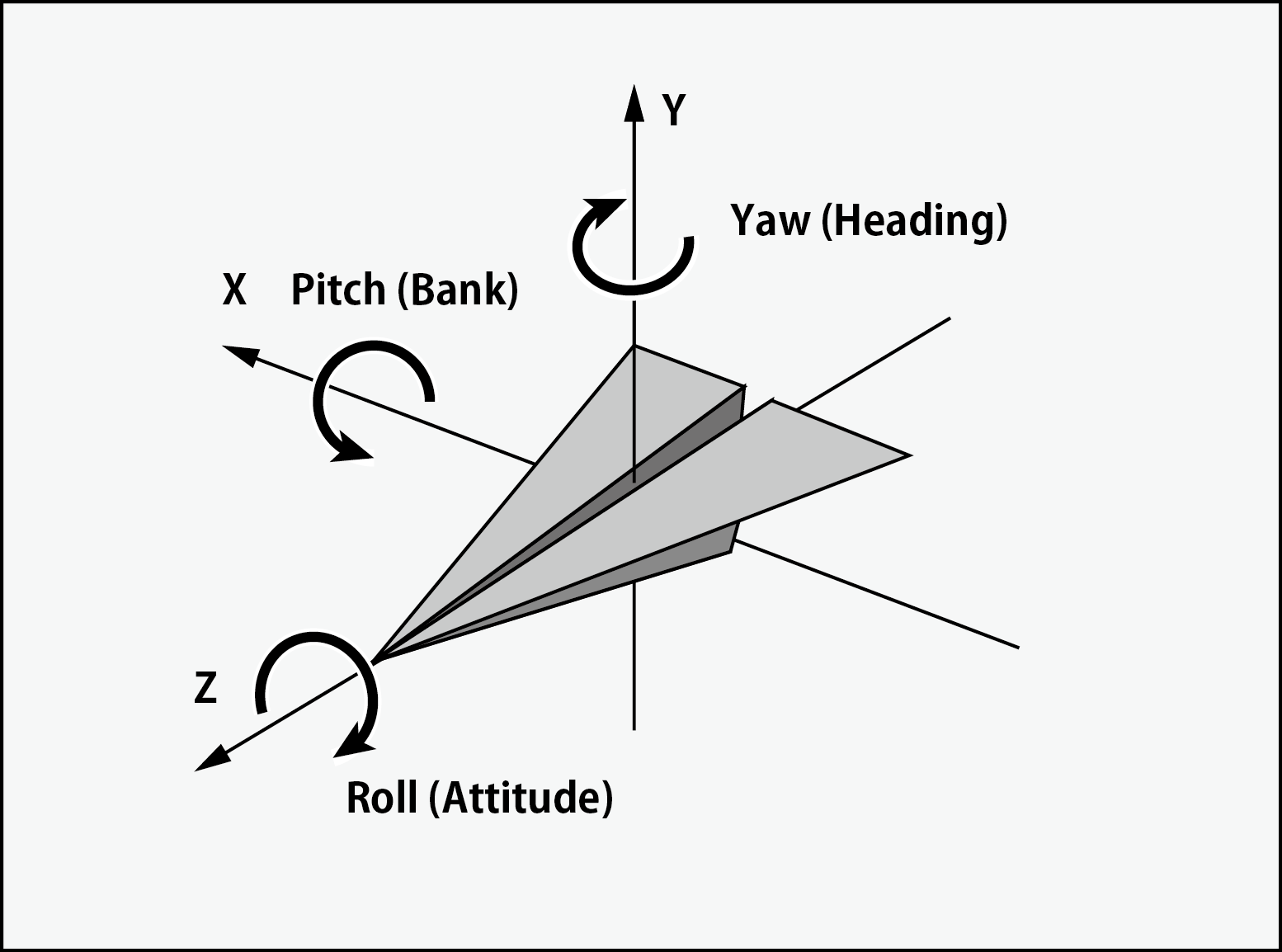
Figure 3.4: Axis and Rotation Names
First, from the velocity about the Z axis and the velocity about the X axis, find the yaw (which direction is facing the horizontal plane) using the atan2 method that returns the arctangent.
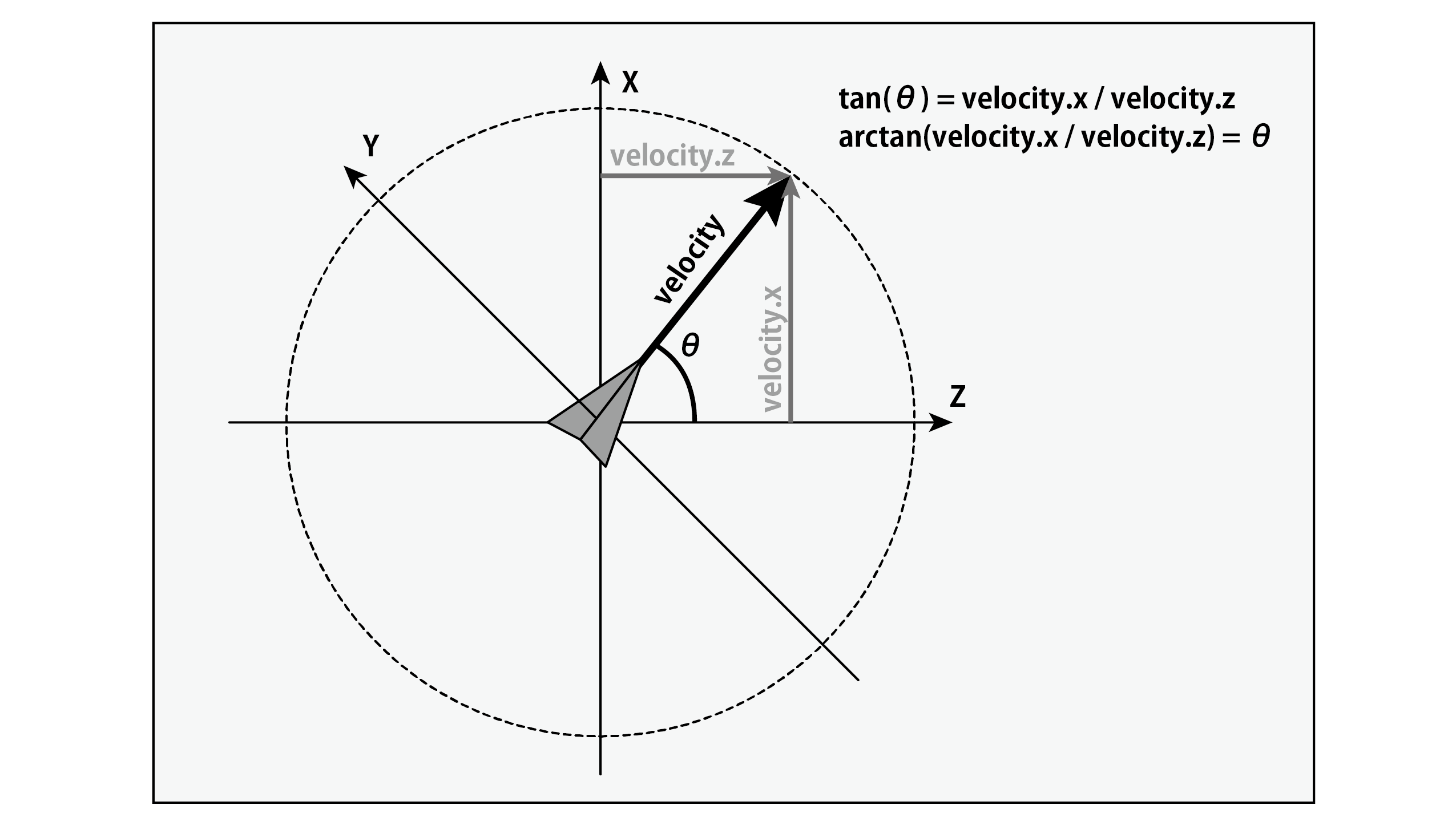
Figure 3.5: Relationship between speed and angle (yaw)
Next, from the magnitude of the velocity and the ratio of the velocity with respect to the Y axis, the pitch (slope up and down) is calculated using the asin method that returns an inverse sine (arc sine). If the speed of the Y axis is small among the speeds of each axis, the amount of rotation is weighted so that there is little change and the speed remains horizontal.
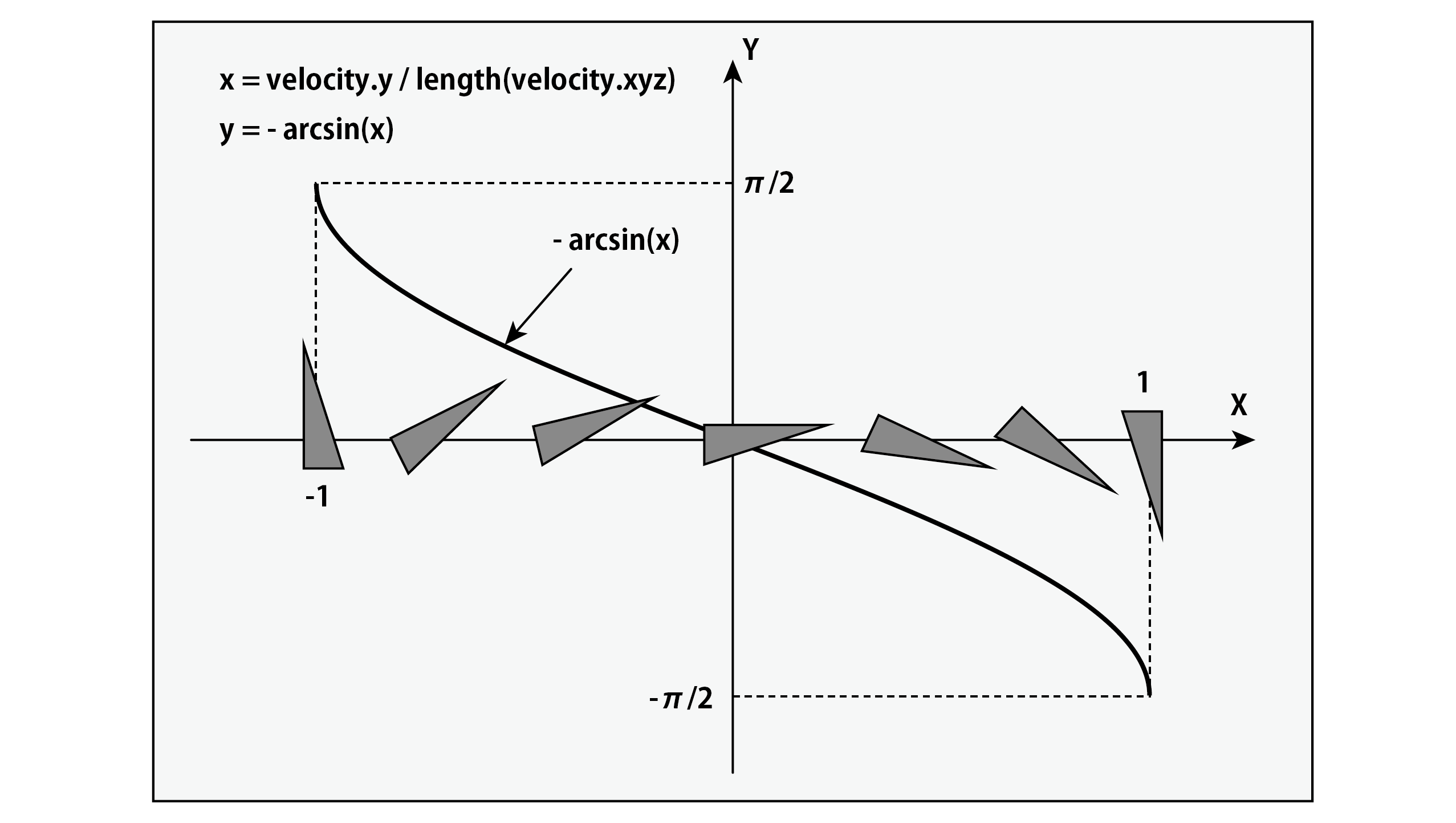
Figure 3.6: Relationship between velocity and angle (pitch)
Coordinate transformation processes such as movement, rotation, and scaling can be collectively represented by a single matrix. Defines a 4x4 matrix object2world.
First, substitute the scale value. The matrix S that scales by \ rm S_x S_y S_z {} on each of the XYZ axes is expressed as follows.
\rm
S=
\left(
\begin{array}{cccc}
\rm S_x & 0 & 0 & 0 \\
0 & \rm S_y & 0 & 0 \\
0 & 0 & \rm S_z & 0 \\
0 & 0 & 0 & 1
\end{array}
\right)
Variables of type float4x4 in HLSL can specify specific elements of the matrix using a swizzle such as ._11_22_33_44. By default, the components are arranged as follows:
Form 3.1:
| 11 | 12 | 13 | 14 |
|---|---|---|---|
| 21 | 22 | 23 | 24 |
| 31 | 32 | 33 | 34 |
| 41 | 42 | 43 | 44 |
Here, substitute the XYZ scale values for 11, 22, 33, and 1 for 44.
Then apply the rotation. If the rotation \ rm R_x R_y R_z {} for each of the XYZ axes is represented by a matrix,
\rm
R_x(\phi)=
\left(
\begin{array}{cccc}
1 & 0 & 0 & 0 \\
0 & \rm cos(\phi) & \rm -sin(\phi) & 0 \\
0 & \rm sin(\phi) & \rm cos(\phi) & 0 \\
0 & 0 & 0 & 1
\end{array}
\right)
\rm
R_y(\theta)=
\left(
\begin{array}{cccc}
\rm cos(\theta) & 0 & \rm sin(\theta) & 0 \\
0 & 1 & 0 & 0 \\
\rm -sin(\theta) & 0 & \rm cos(\theta) & 0 \\
0 & 0 & 0 & 1
\end{array}
\right)
\rm
R_z (\ psi) =
\left(
\begin{array}{cccc}
\rm cos(\psi) & \rm -sin(\psi) & 0 & 0 \\
\rm sin(\psi) & \rm cos(\psi) & 0 & 0 \\
0 & 0 & 1 & 0 \\
0 & 0 & 0 & 1
\end{array}
\right)
Combine this into a matrix. At this time, the behavior at the time of rotation changes depending on the order of the axes of rotation to be combined, but if you combine in this order, it should be similar to the standard rotation of Unity.
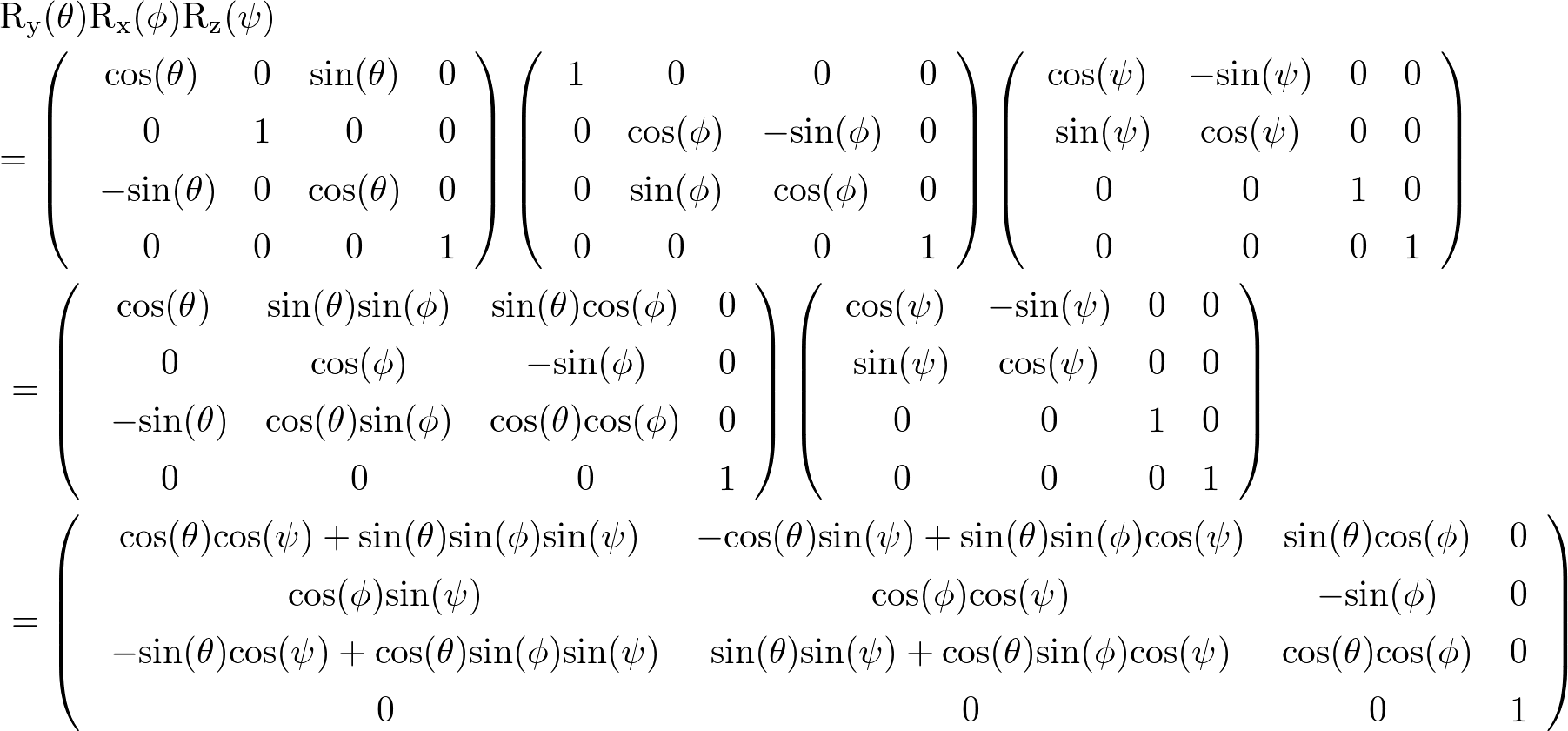
Figure 3.7: Synthesis of rotation matrix
The rotation is applied by finding the product of the rotation matrix thus obtained and the matrix to which the above scale is applied.
Then apply translation. Assuming that \ rm T_x T_y T_z {} translates to each axis , the matrix is expressed as follows.
\ rm T =
\left(
\begin{array}{cccc}
1 & 0 & 0 & \rm T_x \\
0 & 1 & 0 & \rm T_y \\
0 & 0 & 1 & \rm T_z \\
0 & 0 & 0 & 1
\end{array}
\right)
This translation can be applied by adding the Position data for each of the XYZ axes to the 14, 24, and 34 components.
By applying the matrix obtained by these calculations to the vertices and normals, the Boid transform data is reflected.
I think that objects that move like a group like this are drawn.
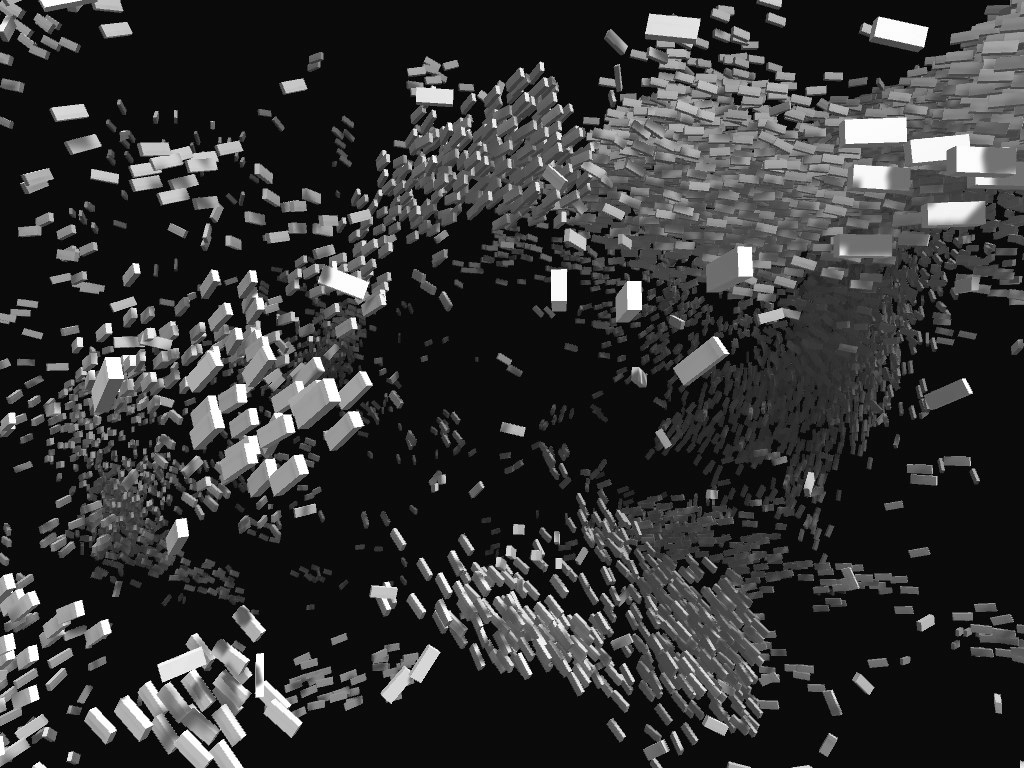
Figure 3.8: Execution result
The implementation introduced in this chapter uses the minimum Boids algorithm, but it has different characteristics such as a large group or a number of small colonies even by adjusting the parameters. I think it will move. In addition to the basic rules of conduct shown here, there are other rules to consider. For example, if this is a school of fish and foreign enemies that prey on them appear, they will naturally move away, and if there are obstacles such as terrain, the fish will avoid hitting them. When thinking about vision, the field of view and accuracy differ depending on the species of animal, and I think that if you exclude other individuals outside the field of view from the calculation process, it will be closer to the actual one. The characteristics of movement also change depending on the environment such as whether it flies in the sky, moves in water, or moves on land, and the characteristics of the motor organs for locomotion. You should also pay attention to individual differences.
Parallel processing by GPU can calculate more individuals than calculation by CPU, but basically the calculation with other individuals is done by brute force, and the calculation efficiency is not very good. To do this, the calculation cost is improved by improving the efficiency of searching for nearby individuals, such as registering individuals in an area divided by a grid or block according to their position and performing calculation processing only for individuals existing in adjacent areas. Can be suppressed.
There is still plenty of room for improvement, and by applying appropriate implementation and behavioral rules, we will be able to express even more beautiful, powerful, dense and tasty group movements. I want to be able to do it.